


GOODCAR - VIN & Plate Lookups
4.446.00 Reviews
App Specs
- Version
- 2.2.8
- Updated On
- License
- Free
- Downloads
- 10,000+
- Developer
- Infopay Inc.
- Categories
- Auto & Vehicles
- Platform
- Android
Screenshots
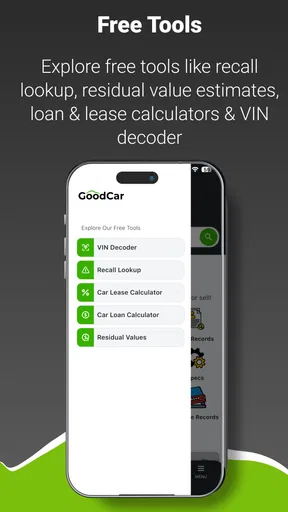
 Analysis by AppCompare
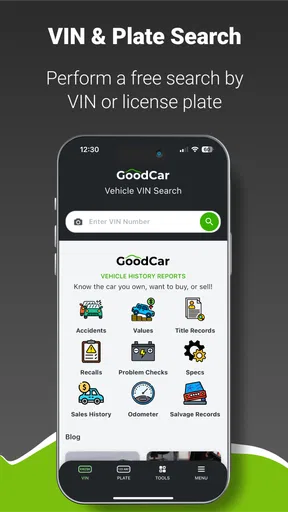
Buying a used car often starts with a small amount of information: a license plate, a VIN, or an advertisement that sounds better than it really is. That is where I found GOODCAR useful. It is an Auto & Vehicles app from Infopay Inc. built around vehicle research, and I approached it less like a destination for casual browsing and more like a quick screening tool before spending time or money on a vehicle.
My main question was simple: can this app help me decide whether a car deserves a closer look? The answer is yes, especially when I use it early in the process. It does not replace a physical inspection, a mechanic, or careful paperwork checks, but it can make the first stage of research more organized. That distinction matters. The strongest reason to install it is not that it magically settles every question about a car; it is that it can help me avoid wasting attention on the wrong one.
How I would decide whether GOODCAR fits my research routine
I would judge a vehicle lookup app by four practical criteria. First, it should reduce the effort needed to start researching a car. Second, it should make information easier to connect to a specific vehicle rather than leaving me with scattered search results. Third, it should be useful at the moment I am comparing several candidates. Finally, it should be clear enough that I know when its results are only an initial signal and when I need another source.
GOODCAR fits that decision process because its focus is narrow and understandable: vehicle research through VIN and plate lookups. I do not need to treat it as a general automotive community, a repair simulator, or a marketplace. I open it when I have a vehicle identifier and want to move from an attractive listing to a more informed question: “Is this particular car worth investigating further?”
That workflow is more valuable than it may sound. A normal web search can produce useful information, but it often mixes general model advice with details about unrelated vehicles. Searching by make and model may tell me what commonly goes wrong with a car, yet it does not necessarily help me evaluate the exact example in front of me. A lookup-centered app gives the research a more specific starting point.
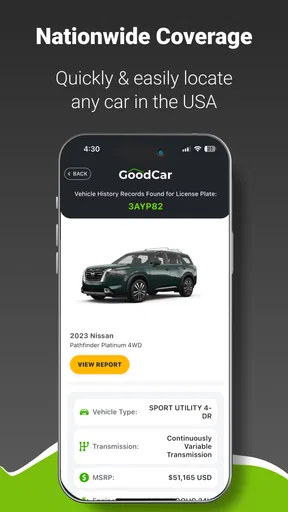
In everyday use, I would keep it open while reviewing listings. If a seller provides a VIN, I can use that as the primary reference. If I only have a plate, the plate lookup gives me another route into the research process. I would record the result alongside the asking price, mileage, service paperwork, and seller claims instead of treating the lookup as a final verdict.
One useful habit is to perform the lookup before arranging a long trip to see the car. This is a small change, but it can save a great deal of time. If the information raises questions that the advertisement does not address, I can ask the seller directly before making an appointment. If the vehicle still looks promising, I arrive better prepared with specific points to check.
Worth Reading Before You Choose

EA SPORTS FC Mobile 26 Is a Bigger Football Game, but It Takes Time

Flipboard Shows What News Apps Must Do Beyond the Feed

Switching to Android Auto Means Rethinking Your Driving Routine

Google Calendar Makes a Crowded Week Easier to Manage

Ludo King Makes the Most of the Minutes Between Plans

Baby Panda World Brings Quick Play to Modern Phones, but Its Game Library Feels Busy
The app is free to install, although in-app items range from around ten dollars to about twenty-five dollars each. That makes the cost decision important. I would not buy anything simply because I felt I had already invested time in a listing. I would first decide whether the vehicle is serious enough to justify a paid lookup or additional research. The best approach is to treat each purchase as part of the cost of evaluating a candidate, not as an automatic step for every car.
What the app is good at when a listing looks promising
The clearest strength is convenience. A dedicated research app keeps the lookup action close to the buying decision. Instead of opening several browser tabs and trying to remember which details belong to which vehicle, I can begin with the identifier attached to the listing. That makes it particularly useful for people who compare cars during short breaks, on a phone, or while messaging multiple sellers.
I also like the way this kind of tool changes the order of the buying process. Many shoppers first become emotionally attached to a car and only later investigate it. I would use GOODCAR in the opposite order: identify the vehicle, research it, write down questions, and only then decide whether the photos and sales pitch deserve my enthusiasm. That is a practical advantage, even before considering any individual result.
A second strength is its usefulness for comparison. Suppose I am choosing between two similar used cars. I can research each one separately, then compare not just the visible condition and price but also the information connected to their identifiers. The app does not need to make the decision for me. It helps me build a cleaner evidence trail so that I am less likely to choose based only on color, trim, or a persuasive description.
A less obvious benefit is that it can improve conversations with sellers. Rather than sending a vague message such as “Is there anything wrong with it?”, I can ask focused questions based on what I found during research. That usually produces more useful answers. It also reveals how comfortable the seller is with specific questions, which is itself part of my judgment. I would still verify every answer with documents and an inspection, but the app can help me ask better questions earlier.
Another good workflow is to use the app as a filter for time, not just information. I can create a short list of vehicles, research them, and reserve in-person visits for the candidates that remain credible. This is especially helpful when a listing is far away or when I am shopping in a competitive market and need to react quickly. The app’s value is therefore partly logistical: it helps decide which cars deserve the next step.
GOODCAR is also approachable for people who do not know much about cars. I do not need to begin with technical knowledge about engines, transmissions, or model-year differences to understand the purpose of a VIN or plate lookup. The app gives a beginner a structured entry point. I would still encourage a new buyer to learn the basics, but the lookup process is less intimidating than trying to interpret a long list of automotive forums and search results.
Where I noticed friction and why context still matters
The biggest limitation is the natural limit of vehicle-history research itself. A lookup can support a decision, but it cannot show me the current mechanical condition of a car parked in front of me. It cannot replace a test drive, a lift inspection, maintenance receipts, or a conversation with a qualified mechanic. I would never use a clean-looking result as permission to skip those steps.
There is also a risk of false confidence. When an app presents research in a convenient format, it is tempting to believe that the vehicle has been fully checked. I think the correct mindset is more cautious: the lookup helps identify questions and possible concerns, while the inspection confirms what is happening now. A car may have an ordinary-looking history and still have worn tires, neglected fluids, warning lights, or expensive upcoming maintenance.
Another point is that the usefulness of the result depends on the identifier I enter. I would double-check every character in a VIN and make sure a plate belongs to the vehicle I am actually considering. A simple typing mistake can send the research in the wrong direction. Before relying on anything important, I would compare the identifier with the car itself and with the seller’s paperwork.
The paid items also create a decision point that free browsing does not. If I am only curious about a vehicle I have no intention of buying, spending money may not make sense. On the other hand, if I am seriously considering a car and the lookup can help me avoid an unnecessary trip or uncover a reason to negotiate, the expense may be reasonable. I would set a personal limit before researching several vehicles so that the costs do not quietly grow.
For that reason, I would not recommend using the app as a substitute for a complete buying budget. The purchase price is only one part of owning a used car. I would leave room for an inspection, registration, insurance, immediate maintenance, and possible repairs. GOODCAR can improve the research stage, but it cannot turn an uncertain vehicle into a low-risk purchase by itself.
How it compares with the usual alternatives
The usual alternative is a standard web search. That option is better when I want broad advice, such as common issues for a particular model, ownership discussions, repair instructions, or opinions from drivers. It is also useful when I am learning about a vehicle before I have a specific VIN or plate. The trade-off is that general search results can be scattered and may not stay focused on the individual car I am considering.
A second alternative is a dedicated history-report service accessed through a browser. That may be preferable for someone who wants a formal report for a single high-value purchase or who already has a familiar service they trust. A browser-based service can also be easier to use on a larger screen when I want to save, print, or compare documents. GOODCAR is more appealing to me when I want a mobile-first starting point and a straightforward way to begin research from a vehicle identifier.
Dealership and manufacturer resources serve a different purpose. They may be better for current recalls, official maintenance guidance, specifications, or service questions connected to a brand. I would use those sources alongside the app rather than choosing one and ignoring the others. GOODCAR belongs earlier in the process, when I am screening a vehicle and deciding which official or professional checks are worth pursuing.
A mechanic is the better alternative when my concern is the car’s present condition. If I have already narrowed the choice to one vehicle, I would put more value on an independent inspection than on performing repeated online lookups. In that situation, the app can still help me prepare questions, but the mechanic provides the physical judgment that a phone cannot.
This is why I see GOODCAR as a bridge between browsing and inspection. It is stronger than casual searching for vehicle-specific research, but weaker than hands-on evaluation for mechanical certainty. Understanding that position prevents disappointment and makes the app more useful.
A realistic buying scenario and a smarter workflow
Imagine I find a used car advertised at an attractive price. The photos are clean, the description is confident, and the seller is several towns away. Before arranging the visit, I enter the VIN or plate in GOODCAR and review what the lookup tells me. I then compare those details with the advertisement and write down anything that needs clarification.
If the seller’s description and the research appear consistent, I still ask for maintenance records and arrange an independent inspection. If something does not line up, I do not automatically accuse the seller or reject the car. I ask for an explanation first. The important point is that the app has changed my next action from “drive out and hope” to “verify this before investing more time.”
When comparing several candidates, I would use a simple notes system outside the app. For each car, I would record the identifier, asking price, mileage, seller claims, lookup questions, inspection status, and estimated immediate costs. This prevents a common mistake: remembering the most attractive car clearly while forgetting why another one was rejected. The app supplies the research trigger; my notes turn that research into a decision.
I would also avoid doing every lookup at the same stage. For a broad search, I might screen candidates using the information already available. Once a car survives that first filter and I am seriously considering it, I would decide whether a paid item is justified. This staged approach keeps the app from becoming an expensive form of browsing and concentrates the cost on vehicles that could realistically become purchases.
One further tip is to research before negotiating, not after agreeing on a price. If the lookup raises legitimate questions, I can include them in the conversation while I still have alternatives. Once I have emotionally committed to the car, I am more likely to minimize warning signs. Using the app earlier protects the quality of my judgment.
Who should install it, and who should choose something else
I think GOODCAR is a strong fit for used-car shoppers, first-time buyers, and anyone who regularly compares private listings. It is also useful for a friend helping someone else buy a vehicle, because the VIN or plate gives both people a common reference point for discussion. The app’s Everyone age rating makes it accessible for general household use, and its free entry point makes trying the basic workflow easy.
I would be more cautious about recommending it to someone who expects a complete mechanical diagnosis, guaranteed ownership history, or a replacement for professional advice. That person may be disappointed because the app is a research aid, not a mobile mechanic. I would also steer a very occasional shopper toward the option that best matches the specific purchase: perhaps a trusted report service for one serious candidate, or a mechanic once the vehicle has passed the initial screening.
It is worth noting that the app has reached a 4.4 average from roughly three hundred ratings, with more than forty written reviews, and has passed ten thousand installs. Those figures suggest that it has a real user base and a generally favorable reception, but I would still judge it by my own workflow rather than by popularity alone. A research tool is valuable only when it helps me make a better decision at the point where I need it.
Installation, compatibility, and the cost of switching
GOODCAR is free to download, runs on Android seven or later, and is currently at version 2.2.8. That makes the basic barrier to trying it fairly low for people with a compatible phone. I would install it before beginning a serious vehicle search, rather than waiting until I am standing beside a car and trying to learn the interface under pressure.
The real switching cost is not technical; it is procedural. If I already use browser searches, saved reports, or notes, I need to decide where GOODCAR fits rather than duplicate every step. My recommendation would be to use it as the first vehicle-specific checkpoint, then move to official resources, seller documents, and inspection when the candidate earns further attention.
The in-app purchase range, from about ten dollars to about twenty-five dollars per item, means I would keep track of which vehicles I have already researched. I would also avoid paying for multiple checks on a car that has already failed a basic comparison on price, condition, or seller credibility. The app can reduce wasted effort, but only if I use it selectively.
Because the developer is Infopay Inc. and the app was released in April 2024, I would expect the experience to evolve over time, so keeping the installed version current is sensible. The present version is 2.2.8. I would still preserve important findings in my own notes, especially before contacting a seller, because my buying decision should not depend entirely on remembering where I saw a detail.
My recommendation after using it as a decision tool
I recommend GOODCAR for the early and middle stages of used-vehicle research. Its best role is to help me move from a listing to a focused investigation, using a VIN or plate as the starting point. It is convenient, approachable, and more specific than a general web search when I am evaluating an individual car.
I would not present it as the final authority on whether a vehicle is safe, reliable, or worth its asking price. The right sequence is lookup, questions, documents, test drive, and independent inspection. Skipping the later steps would turn a useful research aid into a source of overconfidence.
My bottom line is simple: use GOODCAR to decide which cars deserve your time, not to decide everything about a car. If you are comparing used listings and want a practical first filter on your phone, it is worth trying. If you already have one serious candidate and your main concern is mechanical condition, put your money toward a qualified inspection instead. Used-car buying is still a process of verification, but this app can make the first part of that process faster, clearer, and less impulsive.
Pros
- Quick VIN and license plate searches from a mobile device
- Useful for checking a vehicle before buying from a private seller
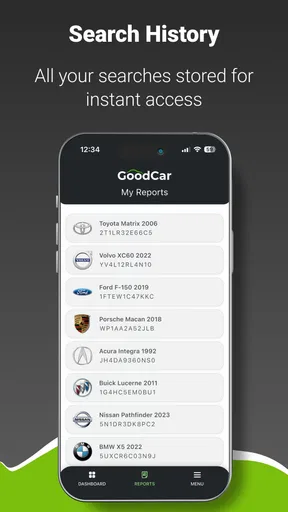
- Search history makes it easy to revisit previously checked vehicles
- Covers key vehicle details such as make
- model
- and registration data
- Simple interface suitable for users with little automotive knowledge
Cons
- Report depth and availability can vary by vehicle and location
- Some detailed information may require an additional payment
- Plate lookup support may differ between countries or regions
- Older vehicles may have incomplete or limited historical records
- Results should be verified with official records before making a purchase
FAQs for GOODCAR - VIN & Plate Lookups
What is GOODCAR - VIN & Plate Lookups used for?
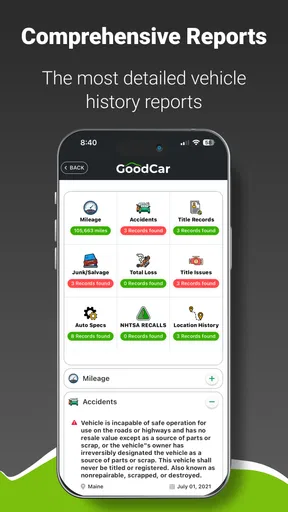
GOODCAR is designed to help users research vehicles before buying, selling, or maintaining them. By entering a vehicle identification number (VIN) or, where supported, a license plate, you can access available information such as vehicle specifications, reported history, recalls, title-related details, and other records. The amount of information depends on the vehicle, data sources, and the region in which the lookup is performed.
Does GOODCAR provide a complete and guaranteed vehicle history report?
No vehicle-history application can guarantee that every event in a car’s past will appear in its database. GOODCAR gathers information from available records, but accidents, repairs, ownership changes, mileage issues, or title events may be missing or delayed. Treat the report as a useful screening tool rather than a final decision. For an expensive purchase, also arrange an independent inspection and verify documents with official authorities.
Can I search a car using its license plate instead of the VIN?
GOODCAR supports VIN-based research as its main identification method, while plate lookup availability can depend on the country, state, and the data legally accessible in that location. A VIN is generally more reliable because it uniquely identifies the vehicle and remains associated with it throughout ownership changes. If a plate search is available, confirm that the returned vehicle details match the car you are examining.
Is GOODCAR free to use, or are some reports paid?
The app may allow users to install it and perform certain basic searches without charge, but detailed reports, expanded records, or repeated lookups can require payment, credits, or a subscription. Pricing and available features may change by platform and region. Before confirming a purchase, carefully review the checkout screen, renewal terms, and whether a subscription will continue automatically.
What should I check before relying on a GOODCAR report?
First, confirm that the VIN shown in the report matches the VIN on the dashboard, door frame, title, and other vehicle documents. Then review mileage consistency, accident or damage records, title branding, theft information, recalls, and ownership history. A clean report does not prove that a vehicle is problem-free, so combine the app’s results with a mechanic’s inspection, a test drive, and official record checks.


